
When you conduct a digital reference check in Refapp, the candidate receives a request to provide their references. The candidate enters the contact details of their references, who then receive a request to complete your reference questions.
1. The candidate receives a request
When you send a reference check request to a candidate, they receive either an email or text message with a link to a Refapp site.
Depending on your settings, the request can be sent automatically via email and/or SMS. If you prefer, you can add your candidate manually to Refapp.
The SMS/email contains information on the upcoming reference process and a request for the candidates to submit their referees.
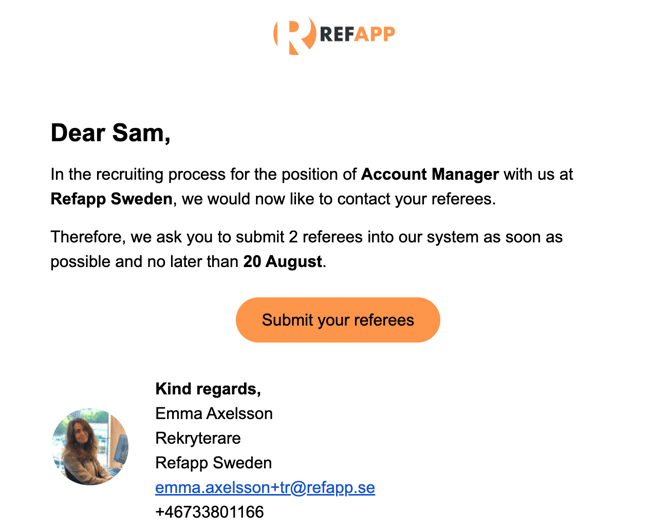
The candidate uses the link to provide their references.
If you'd like to make changes in how Refapp communicates with candidate's you can contact your Customer Success Manager or Refapp suppor to create customized Messaging Templates.
2. The candidate provides their references
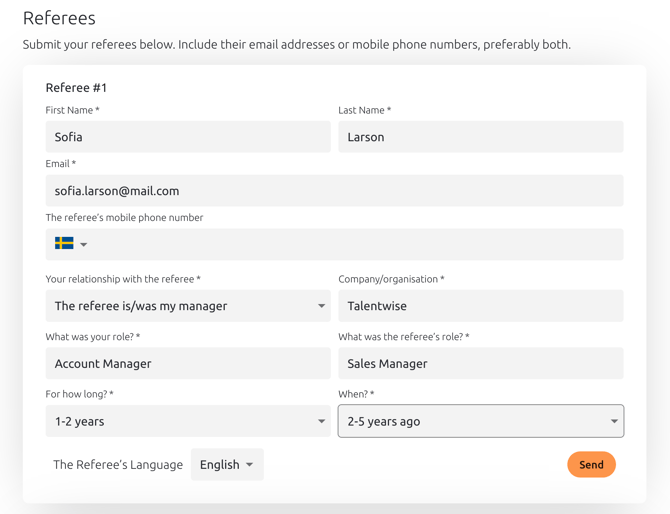
The candidate opens the link and enters the contact details of their references.
Depending on your settings, the candidate may be asked to provide information such as:
- Reference name
- Email address
- Phone number
- Relationship to the candidate, such as previous manager or colleague
You can control which information the candidate needs to provide and how many references they should add.
3. The references receive a request
Once the candidate has submitted their references, the references receive a request from Refapp. The request includes information about the reference check and a link to the questionnaire.
References do not need to create a Refapp account to respond.
4. The references answer the questions
The references open the link and answer the questions you have selected for the reference check.
The questions may cover areas such as:
- The reference's previous working relationship with the candidate
- Responsibilities and tasks
- Strengths and areas for development
- Collaboration skills
- Performance
- Overall recommendation
The questions shown depend on the reference template and settings you have selected.
5. You receive the reference results
Once a reference has submitted their answers, the results become available to you in Refapp.
You can follow the status of your references and see who has responded and who is still waiting to complete their reference.
If a reference has not responded, you can send a reminder or contact them in another way.
Frequently asked questions
Do candidates need to create a Refapp account?
No. Candidates don't need to create a separate Refapp account to provide their references. They simply use the link in the reference request to access the process.
Do references need to create a Refapp account?
No. References can respond directly through the link they receive and don't need to register for a Refapp account.
Can we customise how candidates are contacted?
Yes. Refapp allows you to customise how candidates are contacted and what information they need to provide.
You can choose to send the candidate request automatically via email and/or SMS, or manually add the candidate if you don't want to send a request first.
If you'd like to make changes to how Refapp communicates with candidates, contact your Customer Success Manager or Refapp Support to create customised Messaging Templates.
Can a candidate update the contact details for a reference?
Yes. If a reference request can’t be delivered because the email bounced or the phone number is invalid, Refapp asks the candidate to correct the contact details. Once the candidate saves the new details, the request is automatically sent to the referee again. Read more in What happens when a referee’s contact details are wrong?
If you notice incorrect contact details yourself, you can also update them directly in Refapp.
What happens if the candidate doesn't provide their references?
If the candidate hasn't submitted their references, you can follow the status in Refapp and contact the candidate directly if needed.
What happens if a reference doesn't respond?
If a reference hasn't responded, you can follow their status in Refapp and send a reminder. You can also contact the reference in another way.
If the reference is unable to respond, you can request another reference from the candidate or add a reference yourself.