
How do you review a background check report in Refapp?
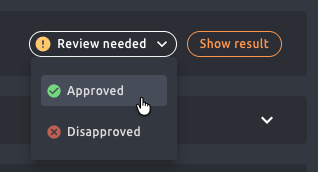
To review a background check report, navigate to the candidate's profile in Refapp and click the Show Result button. After reviewing the report, record your assessment and change the status to Approved or Disapproved. The ability to review reports is controlled by permissions in Refapp.
When a background check report is complete or partially complete and contains something that needs to be reviewed, it will have the status “Review Needed,” and you will receive an email notifying you that the report needs to be reviewed.
Review Needed does not necessarily indicate adverse findings; rather, it is a general status indicating that one or more items in the report require attention. For a more detailed list of the various statuses in the background check and the parameters that may cause a report to require review, see this help article.
Steps to review a background check report
- Navigate to the candidate's profile in Refapp.
- Click the Show Result button to open the report.
- Review the report contents.
- Record your assessment and change the status to Approved or Disapproved.
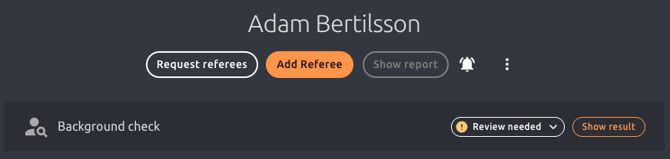
After reviewing the report, you can then record your assessment and change the status to Approved or Disapproved.
What happens when a user can initiate but not review background checks?
If your organization is structured so that certain users can initiate background checks but not review them, those users will only receive a notification that the check has been completed. They will be able to see the recorded assessment status without being able to view the report itself.

What happens to the report after the retention period expires?
Once the retention period for the report has expired, you will no longer be able to view the report itself. However, the status record in Refapp will remain for as long as the candidate is in the system, showing when the background check was performed and what the assessment was.