
Before configuring the Refapp integration in Greenhouse, make sure you have completed the initial setup steps described in How do I configure the integration between Refapp and Greenhouse?
If the previous stage has been completed, follow the steps below.
Add Refapp as a stage in your Interview Plan
If you are using the legacy version of the integration, the next step is to add Refapp as a stage in the job's Interview Plan.
- Go to the relevant job in Greenhouse.
- Navigate to Job Setup and select Interview Plan.
- Select Edit Stages.
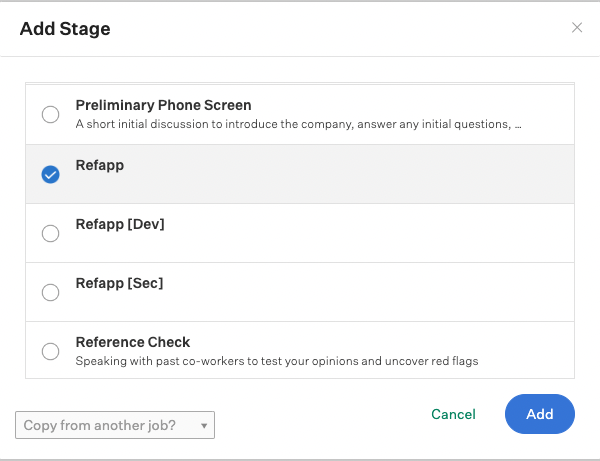
- Select Add Stage and search for Refapp.
- Add the Refapp stage and select Save.
Configure the reference process on your Job ad
Once Refapp has been added as a stage in the Interview Plan, you can configure which reference process to use for this specific job.
Select Edit Interview on the Refapp stage and choose the reference process you want to use.

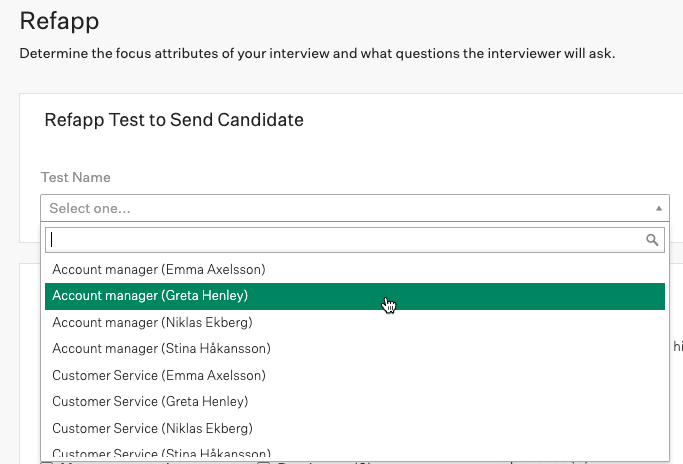
In the Refapp Test to Send Candidate section, select the appropriate option from the dropdown menu.
Note that the options shown in this dropdown are not tests. They represent the available reference-checking processes based on the Project Templates you have created in Refapp and the recruiting users that have been configured.
Select the option (Project Template) that is linked to your user and click Save. If you can't find the correct users in the list, you can add additional users by following this guide.
Once you have configured these steps you are now ready to activate the reference process on your candidates!
Activate the refrence process on a candidate
To activate the reference process, move the candidate to the Refapp interview stage.
When you move a candidate to the Refapp stage, Greenhouse Recruiting will display a Send Test option. Click Send Test to initiate the reference-checking process.

View the completed reference report
Once the reference check has been completed and all referees have submitted their answers, the Interview Kit will contain a link to the completed report in Refapp.
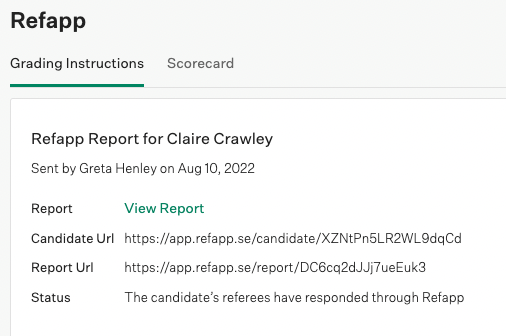
Select View Report to open the completed reference report in Refapp.
For a detailed guide on how to use the Greenhouse integration, see How do I use the Greenhouse integration?