
Ensuring emails reach their destination through spam filters is complex, and we cannot guarantee 100% delivery. One reason our emails are not editable is that we have built them as efficiently as possible to get through spam filters. However, we cannot guarantee that all emails reach their recipients, due to the security requirements in the recipient’s email client.
Therefore, we recommend that you do the following:
First, check whether the referee has opened the email. You can do this by clicking on the referee’s card in Refapp to see the activity log. If the referee has not opened the email after for example 36 hours there is a risk that the email has ended up in a spam filter.

If this occurs, we have some suggestions for solutions:
- Send both emails and SMS if you have the person’s mobile number. SMS has a much higher delivery and open rate.
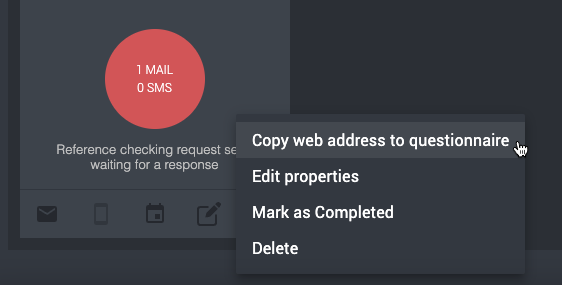
- Copy the link to the form by clicking on the three-dot menu and then “copy web address to the questionnaire”. Then write your own email, paste the link, and send it to the referee.
Also, if you recognize email addresses to which our emails seem to end up in the spam filter - please notify us at Refapp support. That way we can contact their IT department and ask them to whitelist refapp.se as an acceptable domain for incoming emails.
Tip for referees: If you are a referee who has not received an invitation email, also check your spam or junk mail folder, as the message may have been filtered automatically.