
By collecting demographic data, you can also gain valuable insights into your candidate pool and work more data-driven over time.
Using this data, you can:
- Follow up on and work towards diversity goals (DEI)
- Identify potential biases in selection and process
- Make more informed, data-driven decisions
What does this update mean?
We are introducing three new, fully optional fields that candidates can fill in before providing their references.
Which fields are being added?
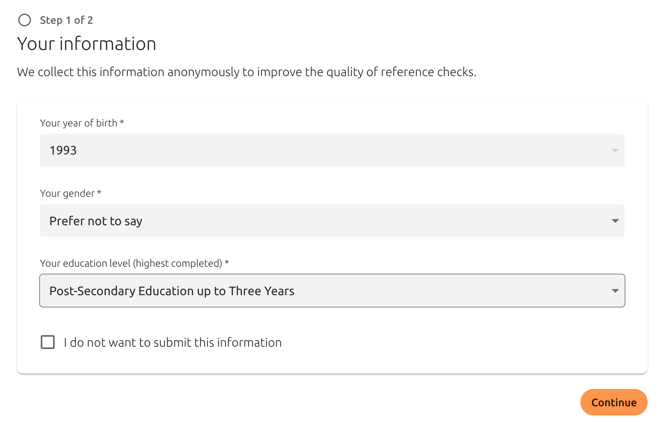
Before a candidate submits the reference data, they will be asked three entirely optional questions:
-
Age
-
Gender
-
Highest completed level of education
FAQ
Is it mandatory for the candidate to answer?
No. All fields are optional. The candidate can choose to skip the questions and proceed directly with the process without it affecting the reference check in any way.
Will the recruiter see the answers?
No. These answers are hidden from the individual recruiter. The data is not shown at the candidate level or in the final PDF report.
How is the data used?
The information is used exclusively at an aggregated level. This means we analyze large datasets to draw conclusions about trends, for example, how reference checking as a method performs across different age groups, genders, or education levels.
Demographic information is not used to make decisions about specific individuals and does not affect individual results. All analysis is conducted with respect for privacy and in accordance with current data protection legislation.
Why is this data being collected now?
At Refapp, we do everything we can to ensure that our tool does not lead to discrimination based on factors such as gender, age, or background. To be able to follow up on and ensure this, we have enabled the collection of demographic data.
Candidates have the option to refrain from answering these questions if they consider them sensitive. The data collection also takes place late in the process, further reducing the risk of it being perceived as intrusive.
Why is this valuable for you as a customer?
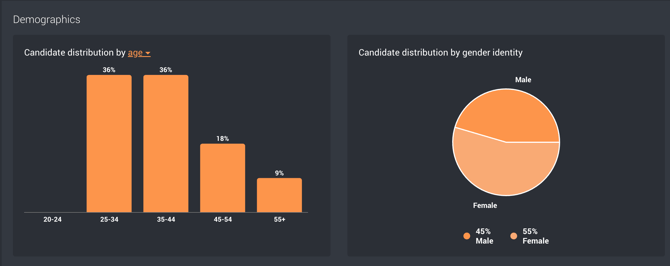
This enables your organization to access anonymized demographic statistics about your final candidates.
For example, it can provide insights into:
- Distribution between different genders in the final stages of the recruitment process
- How results vary across different age groups
- Potential patterns related to education level
This creates better conditions for a data-driven and insight-led approach to diversity and inclusion.
For Administrators
Would you like to activate the feature? As an administrator, you can enable it yourself by following this guide: How do I enable demographic data collection at candidate level in Refapp?