
If your recruitment system is integrated with Refapp, you can use the Competency Framework Module to select competencies directly from your recruitment system when creating a reference check.
This allows recruiters to use the same questionnaire for every recruitment while choosing the competencies that are most relevant for each role.
Note: The Competency Framework Module must be activated on your Refapp account. If you're interested in using this feature, please contact your Customer Success Manager.
Refapp integrates with leading competency framework and assessment providers to deliver reference-check questions aligned with your recruitment process. For a full list of supported partners and integrations, visit Refapp Integration Partners
Step 1: Create a questionnaire with the Competency Framework Module
First, create or update a questionnaire that includes the Competency Framework Module.
- Go to Forms
- Create a new questionnaire or edit an existing one.
- Click Add question and select the Competency Framework your organization uses. The available options will vary depending on which framework your organization has configured.
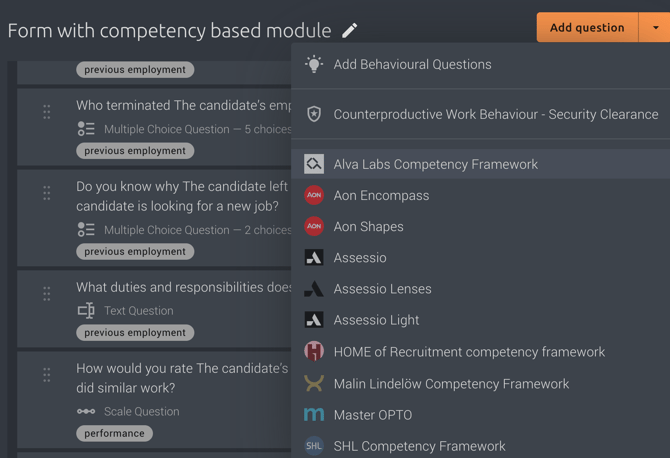
Important: Do not select any competencies in the questionnaire itself. Leave the Competency Framework Module empty so that recruiters can select the appropriate competencies for each role directly in their recruitment system.
Step 2: Use the questionnaire from your recruitment system
When creating a reference check from your recruitment system:
- Select the questionnaire containing the Competency Framework Module, it's highlighted with the puzzle symbol.
- Choose the competencies you want to assess for this recruitment.
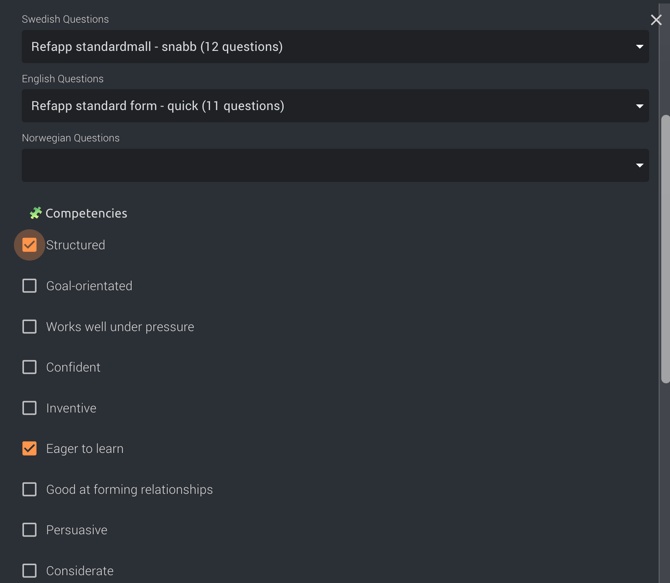
The selected competencies are automatically transferred to Refapp and included in the reference questionnaire sent to referees.
This means you can reuse the same questionnaire across all recruitments while tailoring the competency assessment for each position.
How it works
When a project is created from your recruitment system:
- The questionnaire is synchronized to Refapp.
- The competencies selected in the recruitment system are automatically applied to the Competency Framework Module.
- Only the selected competency questions are included in the reference check.
This ensures your reference checks remain aligned with the competencies assessed throughout the rest of your recruitment process.
💡 Best practice: Create one or two generic questionnaires with an empty Competency Framework Module. For example, maintain one questionnaire for Manager roles and one for Non-Manager roles if your reference process includes different introductory or concluding questions.
Recruiters can then select the appropriate competencies for each recruitment directly in the recruitment system. This keeps your questionnaires easy to maintain while ensuring every reference check is tailored to the specific role.