
If you can’t access a subaccount in Refapp or create a project template for a newly created subaccount, the first thing to check is whether your user has been granted access to that subaccount.
Your access rights determine which subaccounts you can work in. Follow the steps below to check and update your access.
1. Open the user list
- Log in to Refapp.
- Navigate to the Users section.
- Find your user in the list.
2. Check your subaccount access
In the user list, locate the Subaccounts column. This column shows which subaccounts your user has access to.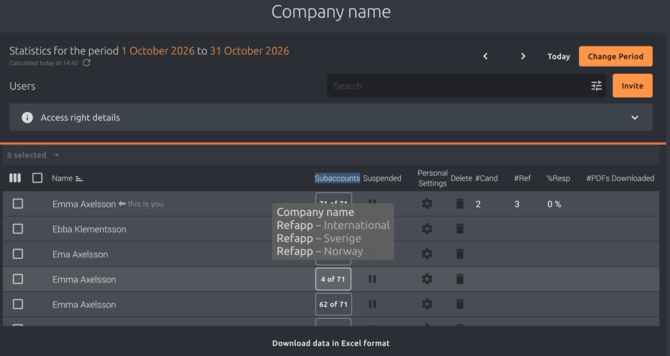
- Find your user in the list.
- Click the button in the Subaccounts column next to your user.
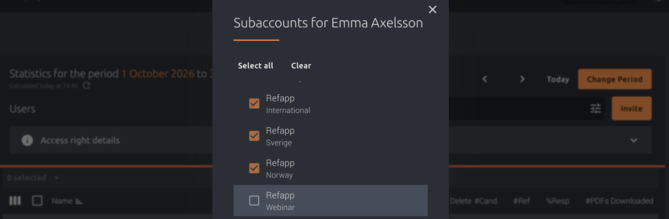
- Review the list of available subaccounts and check which ones are selected.
Make sure the subaccount you want to access is selected.
Example: In the screenshot below, the user has access to Refapp International, Refapp Sverige and Refapp Norway, but not Refapp Webinar.
3. Add or update your access
If the subaccount you need is not selected:
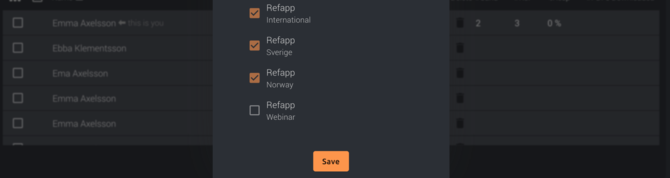
- Select the checkbox next to the relevant subaccount.
- Click Save to apply the changes.
You should now have access to the selected subaccount. Navigate to the relevant subaccount and check whether you can access the features you need.
Still can’t access the subaccount?
You might not have the correct permission.
If the subaccount you need is not selected, you’ll need to contact your Refapp administrator to request access. Only Refapp administrators can add or change subaccount access.
Once your administrator has granted you access, you should be able to access the subaccount and work within it.
If the subaccount is selected but you still can’t access it or create a project template, contact your Refapp administrator for assistance. They can help verify that your access rights and permissions are correctly configured.
Note: Access to a subaccount is a prerequisite for working in it. If you need access to a newly created subaccount, make sure your user has been granted access before attempting to create a project template there.